April To-Do List
Get out your calendar and start circling dates. It’s time to do a little webcomics planning.The content you are trying to access is only available to members.
The Harvey Awards are now accepting nominations. Anyone who creates a comic (that’s you) may nominate fellow creators / titles for the different categories. They have an online nomination form available on their site.
The content you are trying to access is only available to members.
You don’t need a subscription to read today’s Friday Archive Dive!
Even if you’re not a member of the site, you can read the entire post, which originally ran March 20, 2014. If you’ve ever been curious about the kind of information, tutorials and advice that you’ll get as part of your subscription to Webcomics.com, this is a good sample.
If you’d like to join the site, you can get a 12-month subscription for $30 — or you can get a one-month Trial for $5 … with no obligation after your 30 days expire.
You may have noticed something over the past few weeks. You’ll see Google Analytics reporting a huge spike in traffic — and then later in the day, you’ll see that your stats have been adjusted to normal levels. What just happened? Did someone “steal” your readers? Were they ever there?! The answer is pretty interesting.
According to the sources I’m finding, this traffic flux is caused by bots. Analytics identifies it as such and adjusts the number to mitigate the effect — and that causes your traffic report to drop back to normal levels.
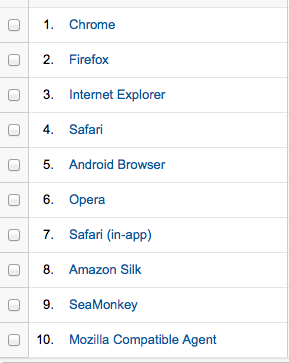
Open Analytics and go to Audience -> Technology -> Browser & OS Report. Look for Mozilla Compatible Agent.
Mozilla’s not a culprit, but it’s an indicator. If you have an unusually high amount of traffic from this source, it’s a clue that something’s up.
Now open Audience -> Technology -> Network report and apply this advanced segment to show only visits where the Browser contains Mozilla Compatible Agent. (Special thanks for the Advanced Segment to Lunametrics.com).
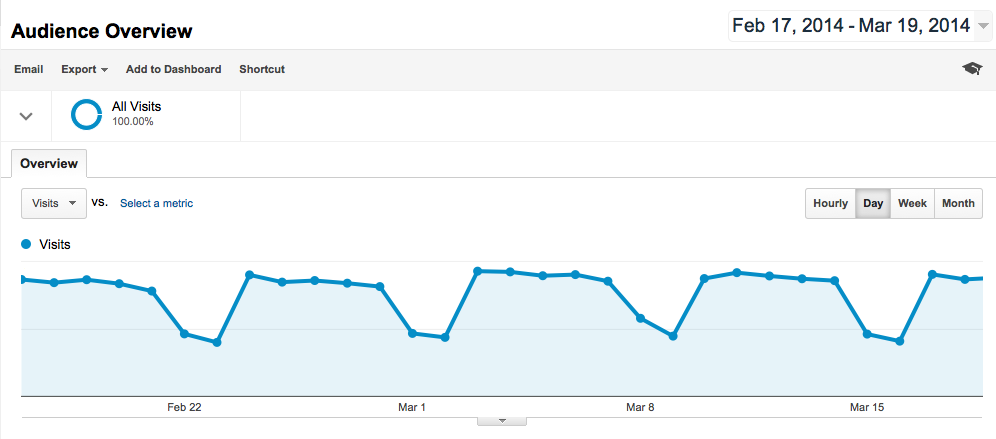
Once you’ve installed the Custom Segment, go back to the main Google Analytics dashboard — Audience Overview (as seen above) — and click the downward arrow at the upper left. Select The “Include Mozilla” segment, and then click Apply.
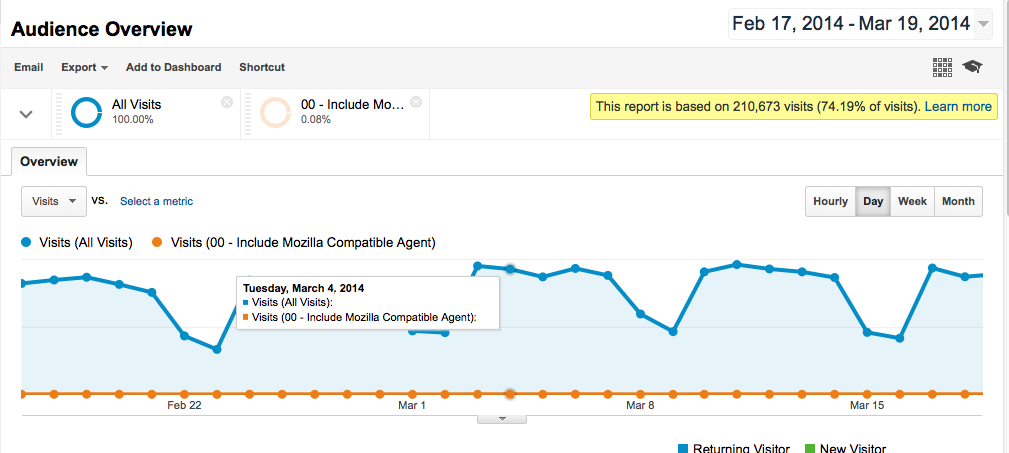
(Note: The image above was created after Analytics normalized my traffic spike.)
Now scroll down and click Service Providers (under Systems). Look for the following:
Also… look at the stats. Here are some dead giveaways for bot-traffic:
If what you’re seeing lines up with the above, you’ve got bots!
Filtering these results out of my report is fairly easy. Click on Admin to access the following dashboard.
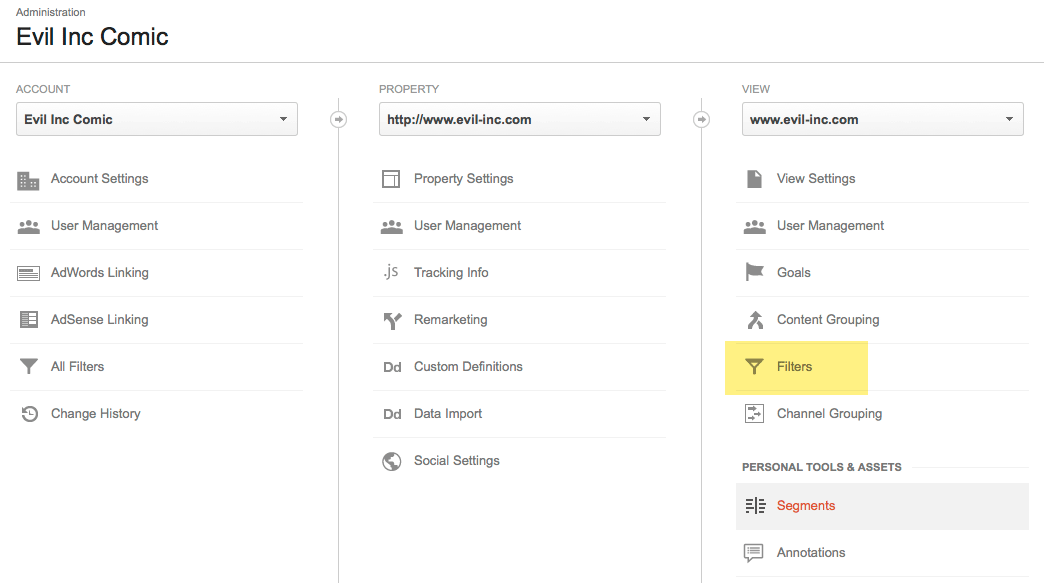
Set up a filter with the following parameters:
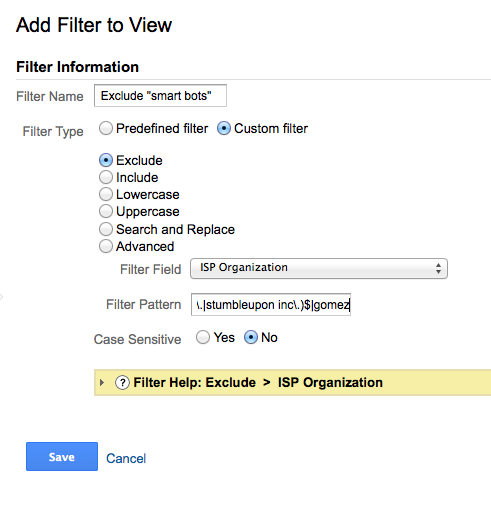
The filter pattern is: ^(microsoft corp(oration)?|inktomi corporation|yahoo! inc\.|google inc\.|stumbleupon inc\.)$|gomez
Your Analytics report will now automatically filter out these bots.
You’re right. The bot-traffic is still there, and it’s causing your traffic report to be sampled — and that’s not particularly good.
The only problem is this — I haven’t been able to dig up a really good solution yet — at least not one that I feel is easily implemented by a garden-variety user. However, I’m going to keep digging, and I’ll report back when I find something that’s useful.
In the meantime — at least for my own curiosity — I’ve solved the Mystery of the Disappearing Traffic Spike. I’ll know better than to get my hopes up next time I wake up to a huge traffic uptick (at least until I can verify that it’s legit). And when it disappears later in the day, I won’t feel quite so cheated.

As I was preparing yesterday’s post on Facebook tips, I kept thinking about one of the facts that I found during my research: Instagram users engage more frequently than users of any other social-media platform. So I decided to check it out for myself.
I was not disappointed.
The content you are trying to access is only available to members.
Facebook is a major viral-marketing powerhouse. There’s no denying that. According to Social Media Examiner, Facebook dominates sharing activity by a 10-1 margin over its nearest competitor (Pinterest). But how we use Facebook — and how it processes our messages — has changed a lot over the years. So I wanted to take a little time to re-evaluate Facebook, discuss some “best practice” advice, and share a tutorial on tracking your progress. To that end, here are 10 ways to use Facebook smarter.
The content you are trying to access is only available to members.
I’ll be doing one-on-one comic consultations while I’m exhibiting at Emerald City Comicon this weekend.
Each consultation comes with a complimentary copy of The Webcomics Handbook.
If you’d like to sit down and discuss strategies for improving in 2015, go to this site and book one of the two options. Use the following coupon code for $25 off:
The content you are trying to access is only available to members.
From time to time, it becomes necessary to “look under the hood” of our Web sites. At times like these, it’s not enough to access your site through your WordPress dashboard. You need to get into your files directly. Usually this is because you need to make a fix, but it also comes in handy when uploading a large number of files or making a coding change.
That’s when you need FTP (File Transfer Protocol).
Here’s a quick step-by-step to get you started.
The content you are trying to access is only available to members.
You don’t need a subscription to read today’s Friday Archive Dive!
Even if you’re not a member of the site, you can read the entire post, which originally ran March 10, 2010. If you’ve ever been curious about the kind of information, tutorials and advice that you’ll get as part of your subscription to Webcomics.com, this is a good sample.
If you’d like to join the site, you can get a 12-month subscription for $30 — or you can get a one-month Trial for $5 … with no obligation after your 30 days expire.
As part of a continuing effort to use Google Analytics to its fullest, I’d like to talk about using its tracking abilities to chart the performance of an ad that you create for your comic.
To do this, we’ll set up a landing page for the ad (as discussed here).
First, go into Analytics and do the following:
Whenever a visitor from your ad gets to this landing page, it registers as an “acheived goal” with Analytics. If you need more information on setting up Goals, you can check out Google’s guide.
This is nice, but it’s not spectacular. So let’s go a little further.
To track your ad’s performance, you’re gonna tag the URL you submit for your ad to point to. You’re going to add the following:
Now we’ll go to a handy tool called the Google URL builder.
Now, I would suggest the following. For this to really rock, you’re going to have to be somewhat specific. For example, wouldn’t suggest a source of “Project Wonderful.” The source should be the Web site on which you’re advertising through Project Wonderful.
If you’re advertising on three different sites through Project Wonderful, you can set up three, different tagged links using the URL builder. In other words, any time one of your variable changes, you need to build a new tagged URL to reflect that change.
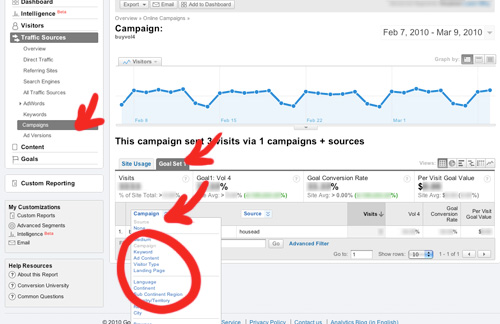
So, assuming your advertisement used the tagged URL, Analytics will begin gathering data based on when that landing page is hit — and from which source/campaign/ad style. To view your results, go to Analytics and look along the left-hand column:
Now you can begin to compare how certain types of ads with certain types of content play on certain types of sites. And you can see which ones are working best — and where they work the best.

The content you are trying to access is only available to members.
This month’s Hot Seat topic is Character Design. The rules are the same for every Hot Seat critique. I’ll start the conversation and then open up the discussion to the general membership. There’s still time for you to submit a character (or characters) for discussion. Just follow the directions in this thread.
The content you are trying to access is only available to members.